---
title: "Launch Week: Day 3 - Talk to a human & send email"
canonical_url: "https://chatthing.ai/blog/launch-week-day-3-talk-to-a-human-and-send-email"
last_updated: "2026-11-03T17:02:46.355Z"
meta:
description: "Today we're thrilled to unveil not one, but two new power-ups: \"Talk to a Human\" and \"Send Email\". "
"og:description": "Today we're thrilled to unveil not one, but two new power-ups: \"Talk to a Human\" and \"Send Email\". "
"og:title": " Launch Week: Day 3 - Talk to a human & send email - Blog - Chat Thing"
"twitter:description": "Today we're thrilled to unveil not one, but two new power-ups: \"Talk to a Human\" and \"Send Email\". "
"twitter:title": " Launch Week: Day 3 - Talk to a human & send email - Blog - Chat Thing"
---
[← Back to blog](https://chatthing.ai/blog)**Blog**# **Launch Week: Day 3 - Talk to a human & send email**

Gem
6 Apr 2024
~ 2 min read
---

---
### **On this page**
1. Day 3 Power-ups: Talk to a human & send email
1. ["Talk to a Human" Power-up](#talk-to-a-human-power-up)
2. ["Send Email" Power-up](#send-email-power-up)
2. [Getting started](#getting-started)
3. [Up next!](#up-next)
**Welcome back to Power-Ups Launch Week at Chat Thing! We're already halfway through our exciting week of new releases, and today, we're thrilled to unveil not one, but two new power-ups: "Talk to a Human" and "Send Email". Let's dive into what each of these power-ups brings to your Chat Thing experience.**
In case you missed the first two days, here's the links
- Day 1: [Zapier Power-up](https://chatthing.ai/blog/launch-week-01-zapier-ai-actions?previews=true)
- Day 2: [Notion Power-ups](https://chatthing.ai/blog/notion-power-ups-launch-week-01-day-2?previews=true)
## Day 3 Power-ups: Talk to a human & send email
The easiest way to see what these two power-ups can do, is to watch our launch video below:
### "Talk to a Human" Power-up
AI bots are getting really good, even still there are often times where they trip up or can't fulfil a user's request.
The is **NOTHING** more frustrating than getting stuck in a dead-end loop with a customer support bot we no escape hatch!
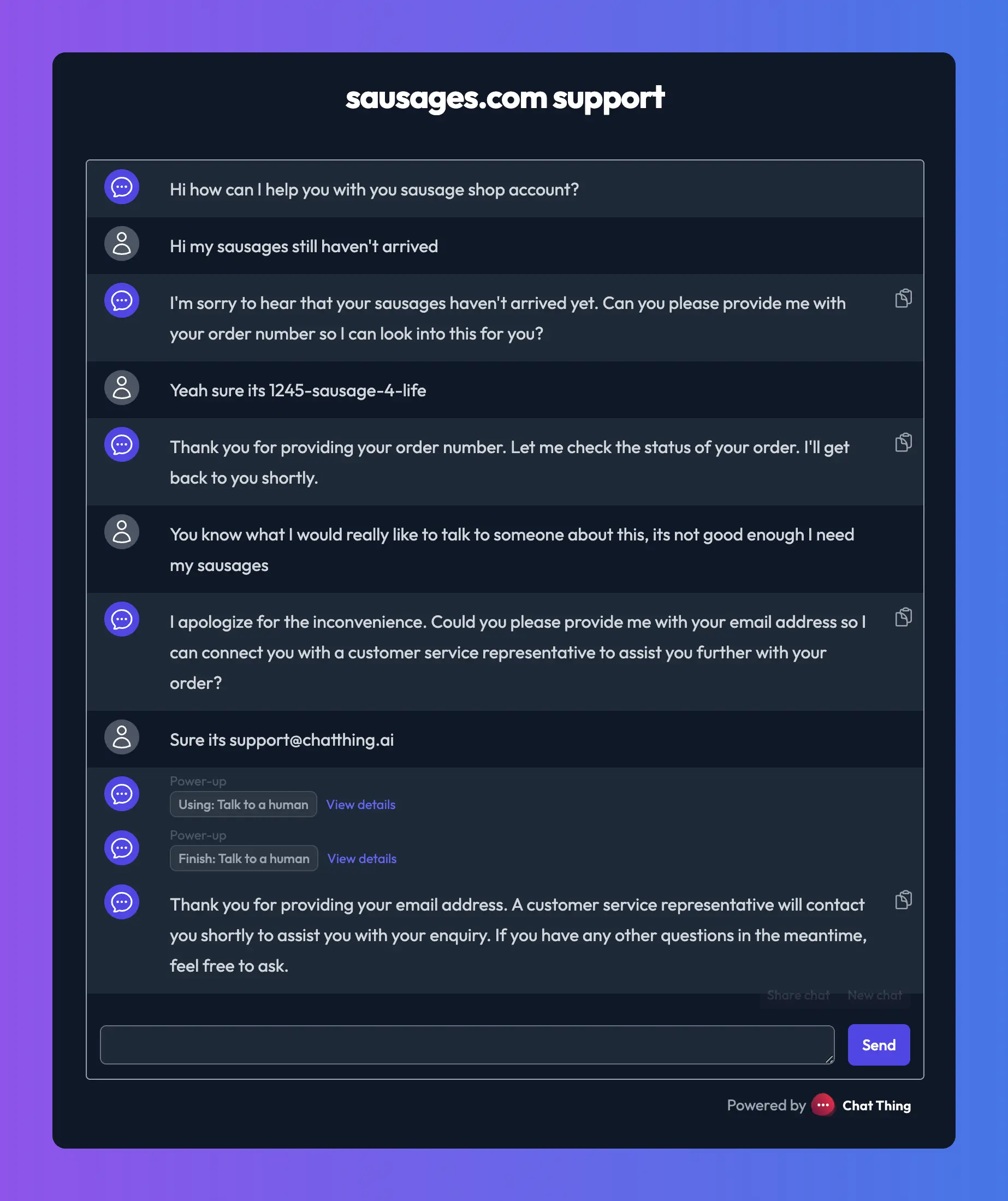
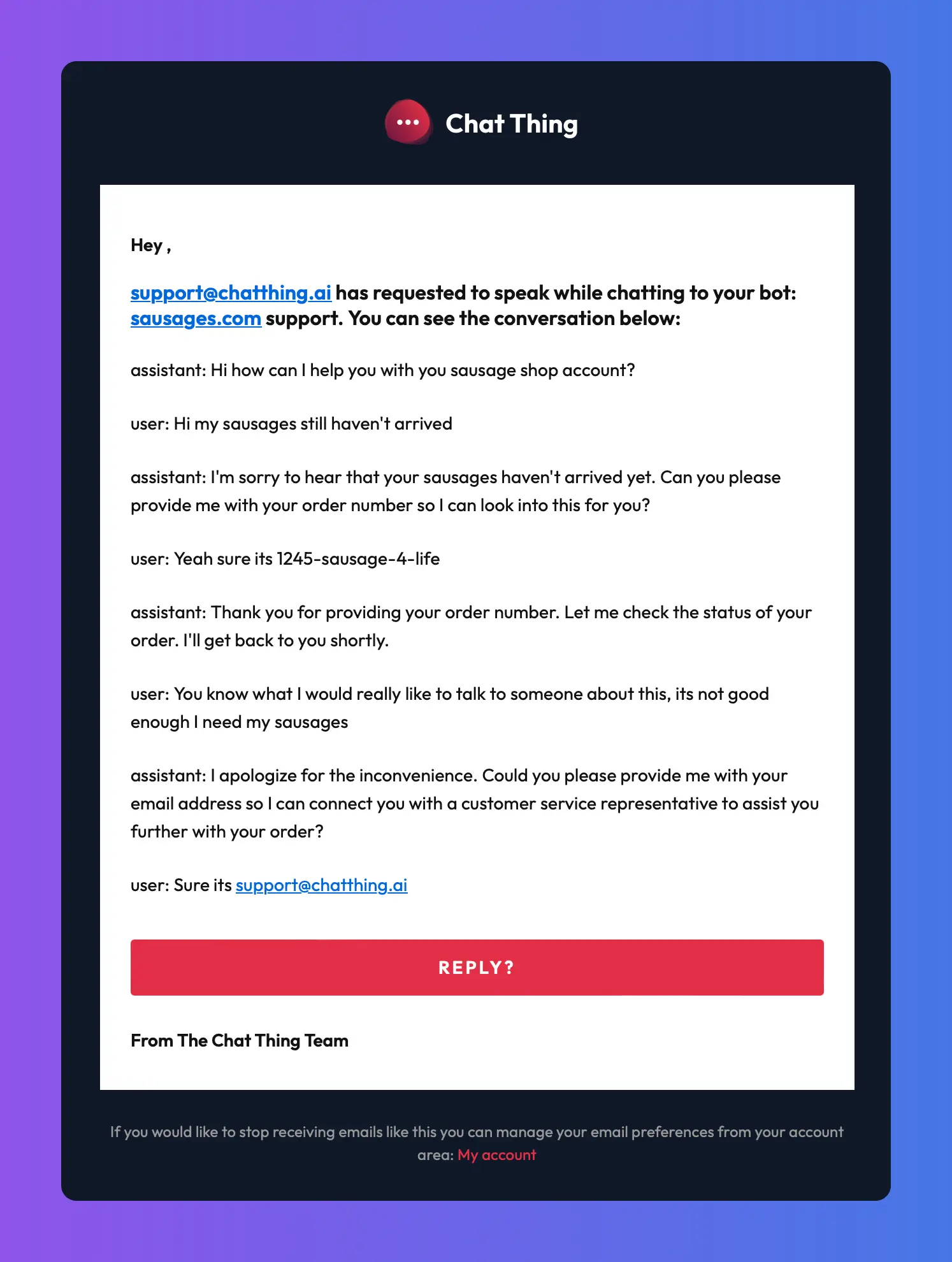
That's why we've built the "Talk to a Human" power-up that allows your chatbot to escalate conversations to a real person whenever needed. User's can simply ask "Can I talk with a human", "Or can someone help me with this" and the bot will ask for their email a notify the bot owner via email so they can pick things up from there.
Here's and example of the power-up in action:
and the resulting email received:
While initially focused on email alerts, we're already working on expanding this feature. Future enhancements will include flagging conversations in the Chat Thing UI that require human intervention, among other user-centric improvements like human takeover of conversations and more.
### "Send Email" Power-up
The "Send Email" power-up allows your chatbot to compose and send emails directly from the conversation.
This power-up can be used in a similar way to the talk to human power-up, but it is more flexible making it useful in other scenarios too.
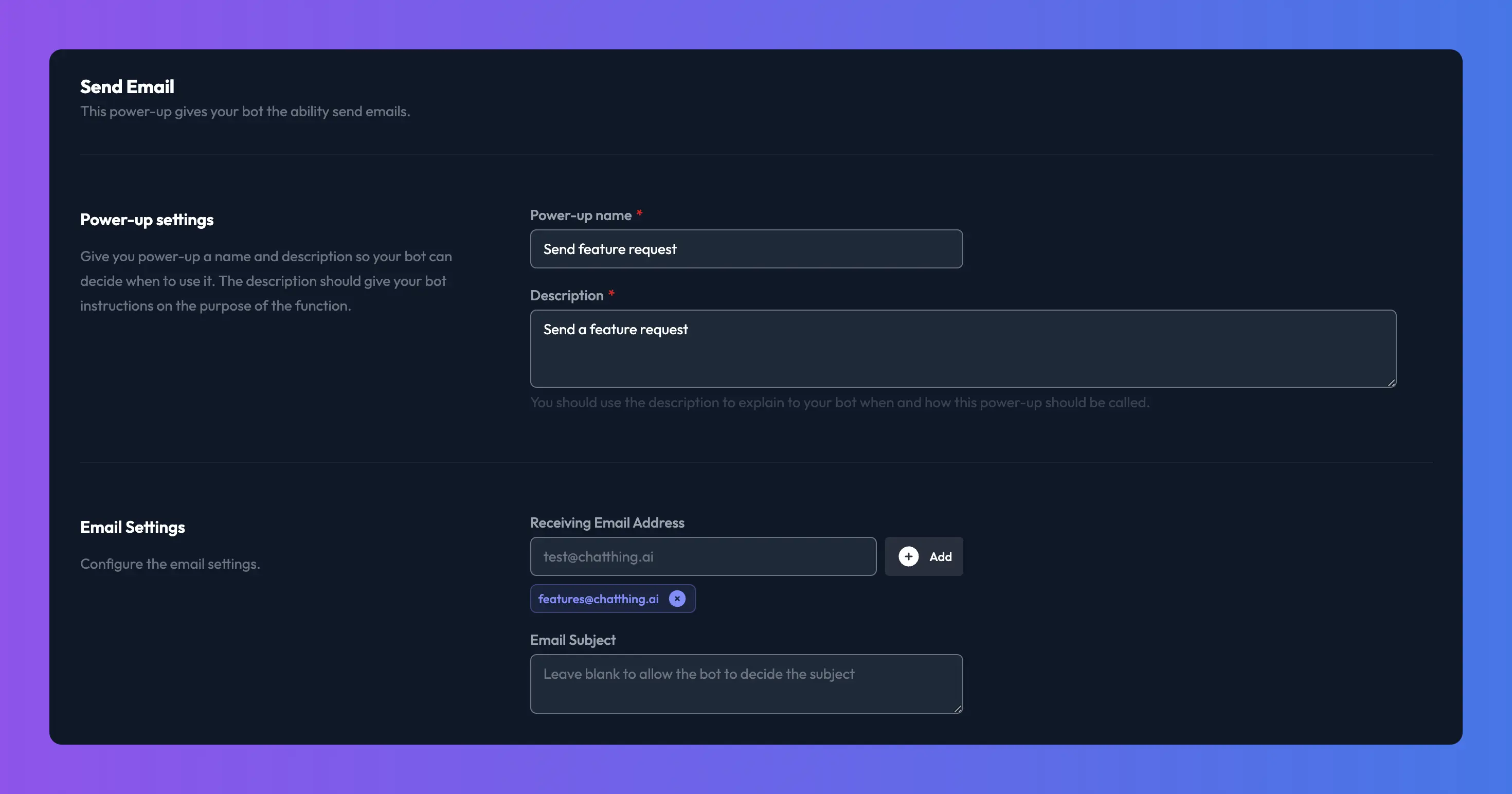
Unlike the talk to a human power-up, the send email power-up allows you to define a list of recipients for the email the bot will send out as well as options to set the subject.
You can use these settings to implement your own version of talk to a human, creating contact forms, submitting feature requests or anything else that can be achieved by sending emails!
Again, this feature is very MVP at the moment and we will expand upon it to make it more powerful. In the future, we plan to allow you to add your own SMTP details or use your own templates etc.
## Getting started
Before you get started with either of these power-ups, we recommend you take a look at our general Power-ups documentation here: [Power-up basics](https://chatthing.ai/docs/power-up-basics&previews=true).
Once you are happy with the basics of Power-ups, take a look at our dedicated docs here: [Talk to a human](https://chatthing.ai/docs/talk-to-a-human?previews=true) and [Send email](https://chatthing.ai/docs/email-power-up?previews=true)
## Up next!
Wow half way through all ready! What a wild ride. We think people will be very excited with tomorrow's announcement when we will release another two power-ups. See you then!
### **Related articles **
[](https://chatthing.ai/blog/custom-gpts-retiring) [Custom GPTs retire on 11 December: what changes and what to do
](https://chatthing.ai/blog/custom-gpts-retiring)
OpenAI is retiring Custom GPTs on 11 December 2026. What moves to plugins, what breaks for shared GPTs, and how to keep yours online.
[](https://chatthing.ai/blog/add-ai-chatbot-to-wordpress) [How to add an AI chatbot to your WordPress site
](https://chatthing.ai/blog/add-ai-chatbot-to-wordpress)
Step-by-step: put a Chat Thing AI agent on any WordPress site with the free WPCode plugin, or embed it in a single page. Real screenshots from WordPress 7.1, plus fixes for the problems you're most likely to hit.
[](https://chatthing.ai/blog/introducing-voice-calls) [Introducing voice calls: your AI agent, now speaking
](https://chatthing.ai/blog/introducing-voice-calls)
Visitors can now talk to your Chat Thing agent from your web chat. It answers from your knowledge, uses your power-ups and keeps your choice of AI model, while your website responds around the conversation.
- **Previous **
- [← More tokens for everyone](https://chatthing.ai/blog/more-tokens-for-everyone)
- **Next **
- [Launch Week: Day 1 - Zapier Power-up →](https://chatthing.ai/blog/launch-week-01-zapier-ai-actions)