---
title: "👥 Big news: Share & manage your bots with our new Teams feature - Blog - Chat Thing"
canonical_url: "https://chatthing.ai/blog/big-news-share-and-manage-your-bots-with-our-new-teams-feature"
last_updated: "2026-10-27T10:33:20.512Z"
meta:
description: "Collaborate, organise, and supercharge your Chat Thing workflow! Our new Teams feature lets you create separate workspaces, invite teammates, and manage multiple bots securely and efficiently. Perfect for agencies, businesses, or any collaborative project, Teams makes working together easier than ever."
"og:description": "Collaborate, organise, and supercharge your Chat Thing workflow! Our new Teams feature lets you create separate workspaces, invite teammates, and manage multiple bots securely and efficiently. Perfect for agencies, businesses, or any collaborative project, Teams makes working together easier than ever."
"og:title": "👥 Big news: Share & manage your bots with our new Teams feature - Blog - Chat Thing"
"twitter:description": "Collaborate, organise, and supercharge your Chat Thing workflow! Our new Teams feature lets you create separate workspaces, invite teammates, and manage multiple bots securely and efficiently. Perfect for agencies, businesses, or any collaborative project, Teams makes working together easier than ever."
"twitter:title": "👥 Big news: Share & manage your bots with our new Teams feature - Blog - Chat Thing"
---
[← Back to blog](https://chatthing.ai/blog)**Blog**# **👥 Big news: Share & manage your bots with our new Teams feature**

Ella
16 Sept 2025
---

---
We’ve got some super exciting news - one of our most requested features is finally here: Teams!
Whether you’re an agency managing multiple clients, a business with distinct departments, or just want to collaborate with your colleagues, Teams is designed to make working together smooth, secure, and fun.
**What does Teams do?**
Teams lets you create separate, isolated workspaces within your Chat Thing account. Each team has:
- Its own bots
- Separate usage data
- Independent subscription plans
No more juggling credentials or messy dashboards — everything stays clean, secure, and organised.
**Use-cases for Teams**
Teams are perfect for:
- Agencies managing multiple clients — each client gets its own workspace
- Businesses with different departments — keep marketing, support, and internal bots separate
- Collaborative projects — multiple teammates can work on the same bot without stepping on each other’s toes
Whether you’re a solo user wanting to stay organised or a larger team collaborating on multiple projects, Teams adapts to your workflow.
**Personal vs Organisation Teams**
- Personal Teams: Every user gets one by default. Just for you, but you can transfer bots or convert to an organisation team if needed.
- Organisation Teams: Invite teammates, manage multiple bots in a single workspace, and share billing easily.
**💡 For existing users with an active subscription:**
You can either:
- Create a new organisation team — start fresh for collaboration and transfer bots manually.
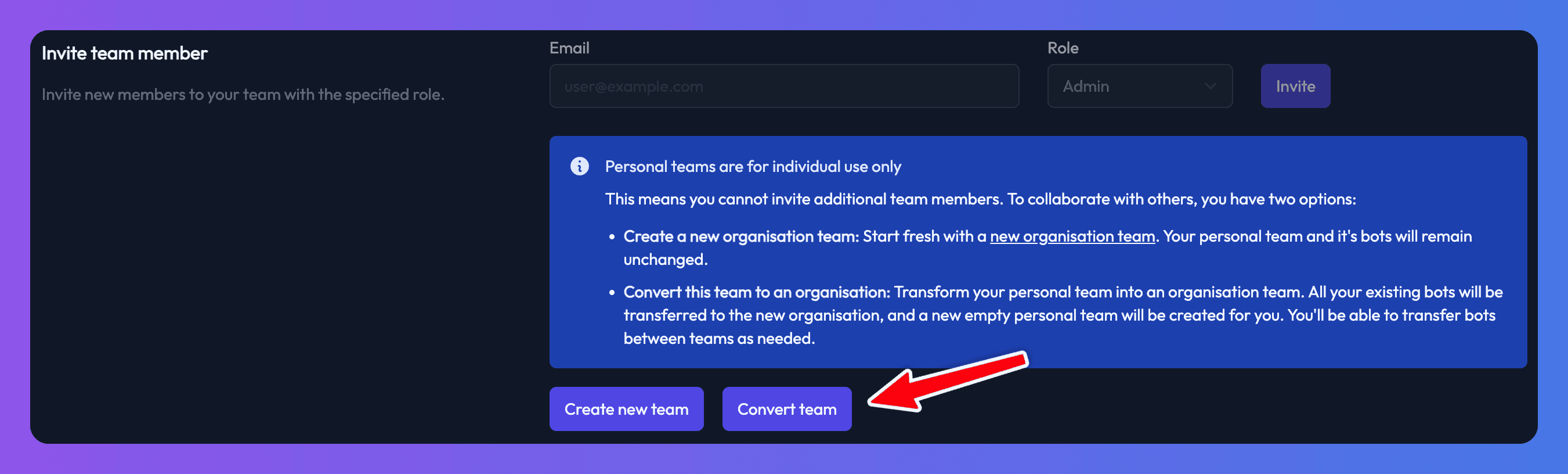
- Convert your personal team into an organisation - keep your current subscription, all your bots, and invite teammates without duplicating billing.
**How to get started**
Create a new organisation team:
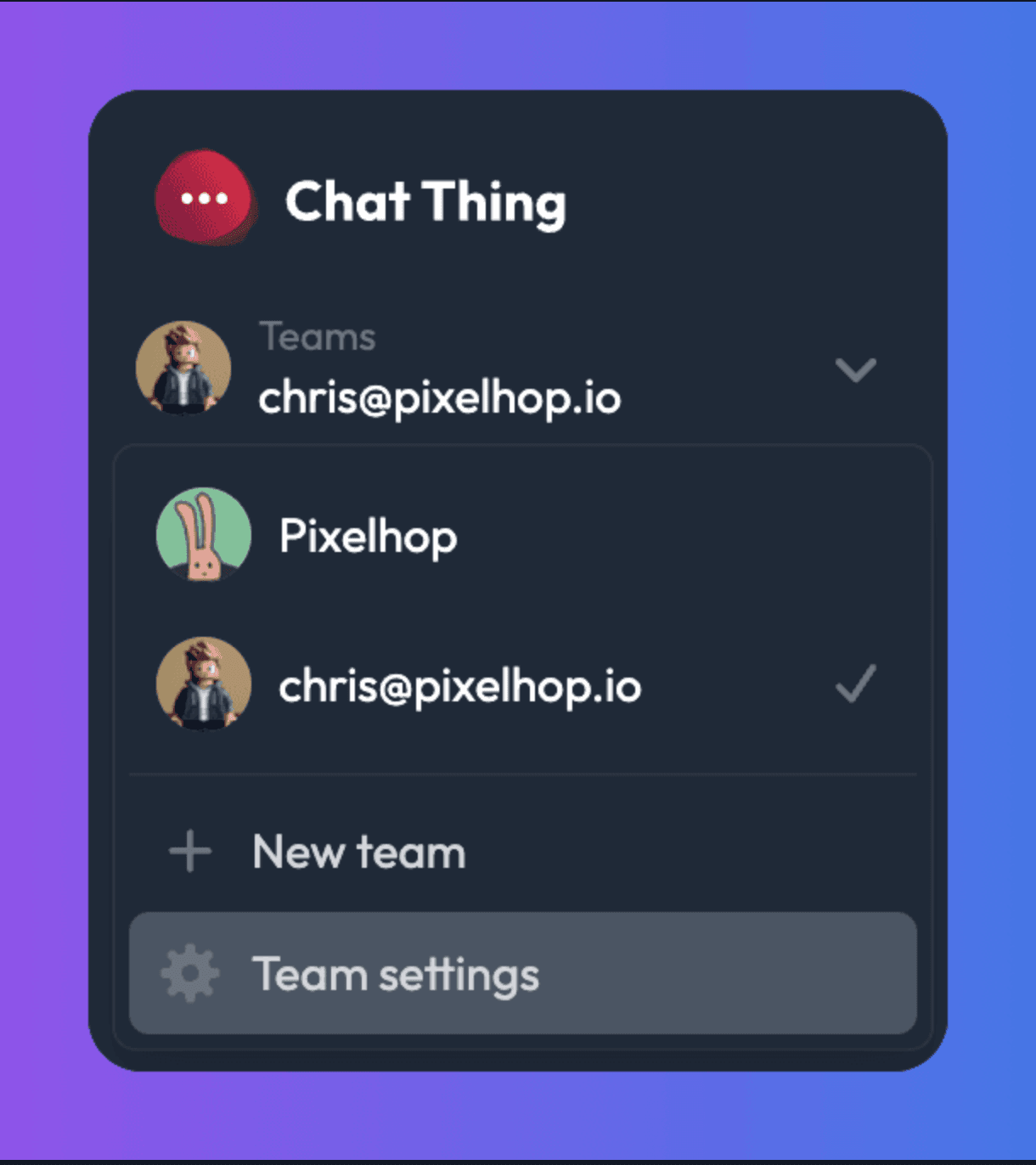
1. Click the team switcher in the top-left of your dashboard
2. Select New team
3. Enter a team name, optional logo, and choose a subscription plan
4. Start collaborating immediately
Convert your personal team into an organisation:
1. Switch to your personal team (your email address)
2. Go to Team settings
3. Click Convert team at the bottom
4. Your personal team becomes an organisation and a new personal team is created for you
Check out our full Teams [ documentation](https://chatthing.ai/docs/teams)
**Try it today!** We can’t wait to see how you use Teams to collaborate, stay organised, and supercharge your Chat Thing workflow.
👉 [Jump into your dashboard and start using Teams](https://chatthing.ai)
### **Related articles **
[](https://chatthing.ai/blog/introducing-voice-calls) [Introducing voice calls: your AI agent, now speaking
](https://chatthing.ai/blog/introducing-voice-calls)
Visitors can now talk to your Chat Thing agent from your web chat. It answers from your knowledge, uses your power-ups and keeps your choice of AI model, while your website responds around the conversation.
[](https://chatthing.ai/blog/chat-thing-webmcp-website-copilot) [Turn a WebMCP-enabled website into a copilot with Chat Thing
](https://chatthing.ai/blog/chat-thing-webmcp-website-copilot)
Chat Thing can now discover the tools a WebMCP-enabled page exposes and let an embedded agent use them. Add the widget, switch on WebMCP, and the page has a conversational copilot.
[](https://chatthing.ai/blog/supportbench) [SupportBench: we tested 7 AI models as customer support agents
](https://chatthing.ai/blog/supportbench)
We tested seven AI models on 1,085 support conversations. Gemini 3.7 Flash led the main score, while Grok 4.6 wrote the preferred reply most often.
- **Previous **
- [← New in Chat Thing: Dictation, Spoken Responses, Spam Protection, Bot Duplication & More!](https://chatthing.ai/blog/new-in-chat-thing-dictation-spoken-responses-spam-protection-bot-duplication-and-more)
- **Next **
- [🚨 New Feature Alert: My Chats - Your Private Space for Personal Bot Conversations →](https://chatthing.ai/blog/my-chats-now-available-on-chat-thing)